
Excel Visual Glossary

As you learn to use Microsoft Excel, you will come across a lot of words and phrases that you will need to know to help develop your knowledge and understanding of the application. This is a visual glossary that includes pictures where possible to help explain the meaning of the terminology, and to help you identify the various elements within the Excel program.

While it is a good idea to browse through this list to gain a basic understanding of the terminology used in Excel, you will also find these terms are highlighted throughout the website with links back to the term in this glossary. Hovering your mouse over the link for a few seconds will show you a short version of the term's meaning. Clicking the link will take you to its entry in this glossary. If you press [Ctrl] on your keyboard and click the link, it will open the glossary in a new tab in your browser so you don't loose your place!


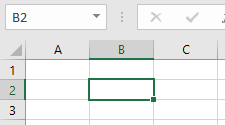
An active-cell located at B2.

Active Cell

The active cell is the cell set to receive information typed into the worksheet. The active cell is highlighted with a green border to indicate it is active. When a range of cells is selected, the active cell usually has a white background. The name of the active cell appears in the Name Box in A1 reference format.
Back To Top

An active cell located at B2.

Cell

A cell is the basic building block of an Excel worksheet. It is a single box located at the intersection of a column and row and they are identified by the column letter and row number forming that intersection, known as the A1 reference format. Cells are used to enter, store, display and/or calculate a single piece of information that is combined with information in other cells to create the spreadsheet.

Back To Top

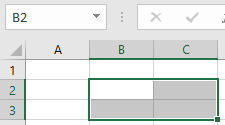
The range of cells "B2:C3".
(Cell "B2" is active.)

Range

A range is a group of cells forming a square or rectangular grid. A single cell can also be called a range. A range is identified by the address of the cell in the top left-hand corner together with the address of the cell in the bottom right-hand corner of the range separated by a colon. For example, "B2:C4". If the range is selected, it will have a green border with a grey background except for the active cell which will usually have white background.

Back To Top

Sheet

Sheet is another name for worksheet.

Back To Top

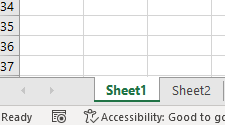
Worksheet tabs.

Worksheet

A worksheet (also known as a "spreadsheet" or "sheet") is a single page in a workbook containing a selection of cells that are organised into columns and rows to form a table that helps you to organise information. A workbook can contain one or more worksheets, and information can be linked between them. Worksheets are listed as worksheet tabs in the bottom left-hand corner of the Excel window.
(See: {link_WorkSheet-Navigation}).

Back To Top
Copyright © 2022 mod-dev.com.  All rights reserved.
Powered by Modularware™ a ComDotAu™ Company.